
The introduction of the ChatGPT App Directory marks a significant transition in the user experience with artificial intelligence, going in the direction of ChatGPT being a platform with various functionalities that can be accessed by the user through the conversation regardless of the text-only platform. This transition allows the performance of real-life tasks ranging from making presentations to grocery shopping to be done through the chat interface easily. The directory brings together ChatGPT apps from third-party developers under a centralized hub, similar in concept to an app store but tailored for AI workflows.
In this article, we explain how the ChatGPT App Directory works, its capabilities, ChatGPT apps availability including regional considerations like ChatGPT apps Europe, how developers can Submit and Connect apps, examples of use cases, potential challenges.
What Is the ChatGPT App Directory?
The ChatGPT App Directory is a centralized catalog inside ChatGPT where users can browse, discover, and connect third-party apps that extend ChatGPT’s capabilities. Instead of traditional installation, users connect apps to their ChatGPT account, granting access so tools and data from external services can enrich conversations.
This directory functions much like a traditional app store — with categories (such as Featured, Lifestyle, Productivity) and search — but instead of downloading apps to a device, users enable them within ChatGPT’s chat environment. The directory is accessible:
- From the ChatGPT tools menu in the left sidebar
- Via the browser at chatgpt.com/apps
- On mobile and desktop apps where supported
Apps in the directory can be invoked either by selecting them from the menu or by mentioning their name in prompts during conversations.
How ChatGPT Apps Work
“Apps in ChatGPT” include traditional third-party services and previously called “connectors,” which pull data from user accounts or external sources into responses. OpenAI rebranded connectors as apps to unify the experience.
Types of ChatGPT Apps
- Interactive apps — Provide UI or workflow tasks like booking trips or managing files.
- Search and reference apps — Let ChatGPT pull and use real-time data from linked services.
- Deep research tools — Enable broader information retrieval beyond basic responses.
- Sync apps — Keep content up to date with user data sources.
Once connected, apps can interact with ChatGPT responses. For example:
- Ask a travel question and have the Booking.com app show options.
- Mention a music request and the Spotify app will suggest tracks or playlists.
- Generate a graphic using Canva or a slide deck through Figma or Canva.
Connecting Apps: Step by Step
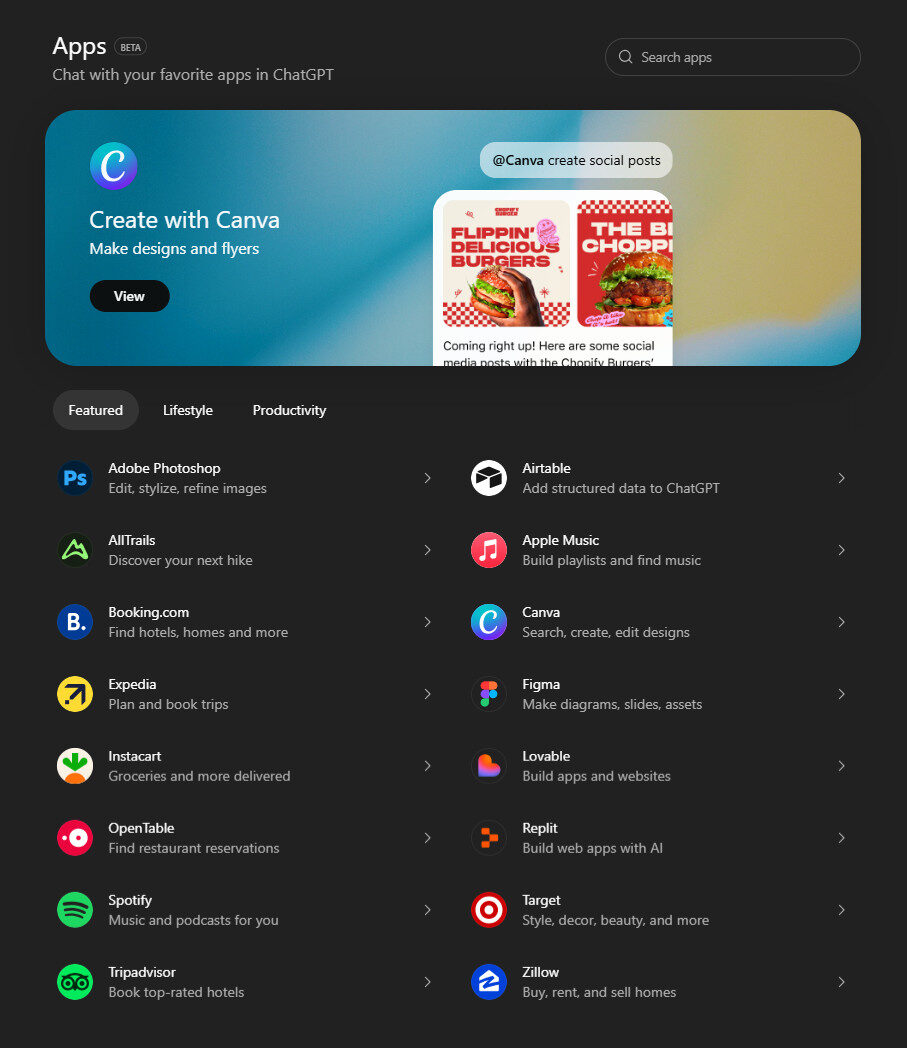
Image Credit: ChatGpt Apps
Connecting and using apps inside ChatGPT is straightforward:
- Open the App Directory — Access it from the Tools menu or at chatgpt.com/apps.
- Browse or Search — Explore by category or search by app name.
- Connect — Click the Connect button and authorize data access if required.
- Invoke in Chat — Start using the app by mentioning its name (e.g., @Spotify).
- Manage Apps — View connected apps in your settings and disconnect as needed.
This integration maintains user control: apps are only enabled after explicit authorization, and users can unlink them at any time to stop data access.
Examples of ChatGPT Apps
The ChatGPT App Directory launched with a set of well-known services, and more are being added regularly:
- Spotify – Create playlists and search music from ChatGPT.
- Zillow – Search real estate listings within chat conversations.
- Booking.com & Expedia – Plan trips and explore travel options.
- Canva & Figma – Design visuals and presentations.
- Coursera – Find and manage online courses.
- DoorDash – Turn meal ideas into actionable orders from within ChatGPT.
- Apple Music – Helps build playlists and manage music libraries.
Each app brings a unique integration, often letting users complete tasks — like trip booking, design, or music curation without leaving ChatGPT’s interface.
ChatGPT App Store vs App Directory
Although people sometimes refer to it as a “ChatGPT App Store,” the official term used by OpenAI is App Directory. Its structure resembles an app store, but instead of downloading external app packages, users connect online services and integrate them into ChatGPT.
Key differences include:
- No separate installation — Apps run inside ChatGPT.
- Data permissions via Connect — Users authorize data access per app.
- In-chat invocation — Apps can be used in natural language, not via separate launch icons.
Connected Apps and User Experience
Once connected, ChatGPT can invoke app logic directly inside the conversation. For example:
- A real estate query may trigger the Zillow app and display housing data.
- A request to book a hotel can use Booking.com app functions.
- A prompt to edit a document might leverage Dropbox to fetch files.
Apps can also appear proactively based on conversation context, with ChatGPT suggesting relevant tools. This smart suggestion mechanism uses usage patterns and context signals to surface helpful apps without explicit search.
Developer Submissions and the Apps SDK
In December 2025, OpenAI opened the ChatGPT app submission process for third-party developers. Verified developers can build apps using the Apps SDK and submit them to the directory for review. Approved apps are then discoverable by users across platforms.
Developer Process
- Build with the Apps SDK — Use tools and guidelines provided by OpenAI to package functionality.
- Submit for Review — Upload app metadata, capabilities, and privacy details.
- Approval & Publication — If approved, publish the app in the directory.
- Updates and Maintenance — Developers can resubmit updates as needed.
OpenAI’s review ensures apps meet quality, security, and safety standards before they become available to users. This curated process helps maintain a trusted ecosystem.
ChatGPT Apps Availability and Geographic Considerations
Apps are rolling out globally, but not all features are available everywhere immediately. Some services may be restricted in regions like the European Economic Area (EEA), United Kingdom, or Switzerland based on regional service availability by partners.
Major availability points:
- Many apps are accessible to ChatGPT users worldwide (Free, Go, Plus, Pro plans).
- Some interactive or deeply integrated functionalities may be limited in specific markets until partners expand support.
- OpenAI continues to expand ChatGPT apps Europe, with broader regional availability planned as services onboard and regulatory requirements are met.
Users should check the App Directory within ChatGPT to see which apps are supported in their region.
Benefits of the ChatGPT App Directory
1. Centralized Discovery
The App Directory lets users discover tools across categories from one place — no need to search external websites or manually integrate services.
2. Enhanced Functionality
Apps bring real-world context and actions into ChatGPT, turning prompts into productive outcomes (e.g., ordered meals, designed graphics, or travel plans).
3. Natural Language Invocation
Instead of clicking and switching contexts, users can call apps with natural language prompts, enabling seamless task workflows.
4. Data Integration and Personalization
Connected apps can pull data from user accounts or external tools, enriching responses and making them more relevant and actionable.
5. Developer Ecosystem Growth
Opening app submissions encourages innovation, inviting developers and companies to extend ChatGPT’s reach into many domains and specialized workflows.
Challenges and Considerations
1. Privacy and Permissions
Apps often require access to user data or third-party accounts. Users must carefully review permissions and privacy policies before connecting.
2. Regional Limitations
Not all apps are available everywhere immediately, and some features may be restricted by partner compatibility or compliance requirements.
3. Quality and Safety
While apps are reviewed before listing, users may still encounter variability in quality or usefulness. OpenAI’s review process seeks to maintain high standards.
Conclusion
The ChatGPT App Directory indicates a change that makes it possible for AI assistants to become really interactive and useful, beyond just giving text responses. Through combining ChatGPT applications in a single, app-store-like interface, users are provided with access to incredible tools such as booking flights, creating music playlists and designing workflows, all of which can be done inside the chat.
From expanding capabilities to enabling deeper integrations and inviting developers to contribute applications, the app directory enhances ChatGPT’s role as a versatile productivity hub. As regional support broadens, including for ChatGPT apps Europe and more developers publish apps, this ecosystem is set to redefine how users engage with AI and third-party services in 2026 and beyond.
FAQs
What is the ChatGPT App Directory?
It’s a centralized directory inside ChatGPT where users can browse, connect, and use third-party apps directly within the chat environment.
How do ChatGPT apps work?
After connecting an app, users can invoke it by name or from the tools menu, allowing ChatGPT to pull data or execute tasks without leaving the conversation.
Are ChatGPT apps free?
Many apps are available to Free, Go, Plus, or Pro users, but some features or apps may require account authorization with external services.
Can developers submit apps to the directory?
Yes. Verified developers can use the Apps SDK, submit for review, and publish apps in the ChatGPT app directory.
Are ChatGPT apps available in Europe?
Yes, but some apps’ availability varies by region and partner service coverage. OpenAI continues to expand support for ChatGPT apps Europe.
How do I connect an app in ChatGPT?
Go to Settings > Apps, browse the App Directory, click Connect, and authorize access. Once connected, use the app in chat by mentioning it or selecting it from the tools menu.