
Google’s A2UI project marks a significant shift in how AI agents can interact with users — moving beyond static text responses toward dynamic, richly interactive user interfaces that agents can generate on the fly. Released as an open-source effort in December 2025, Google A2UI — short for Agent-to-User Interface — establishes a protocol that lets AI systems safely describe interfaces that host applications render using native UI components. This change promises to unify AI and frontend engineering in a way that’s secure, cross-platform, and adaptable across web and mobile frameworks.
In this article, we’ll break down what Google A2UI is, why it matters, how the Google A2UI protocol works, real-world examples, and practical steps to get started — including references to GitHub repos, demos, and current integration options like Flutter.
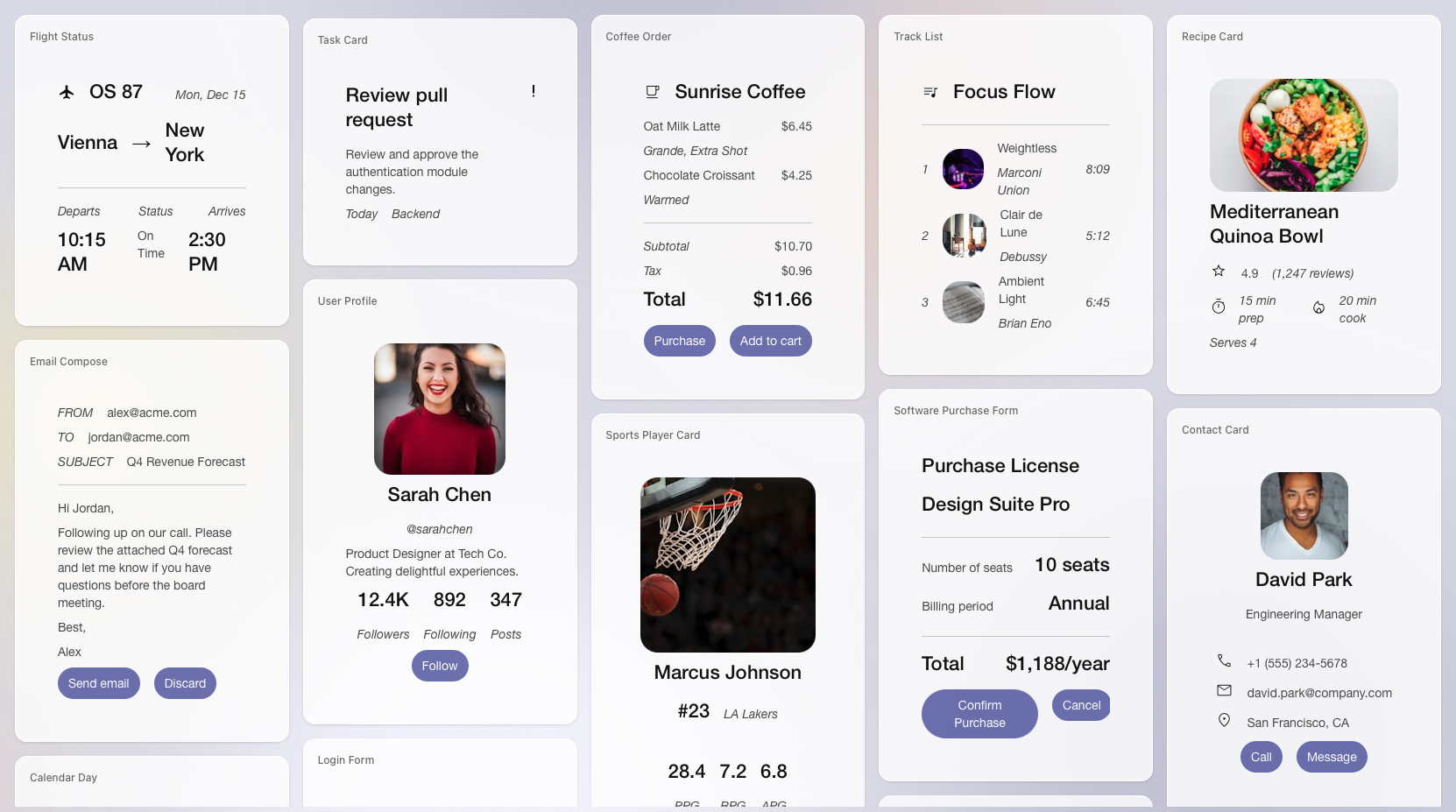
Image Credit: Google
What Is Google A2UI?
At its core, Google A2UI is:
- A declarative protocol (a specification) for AI agents to communicate user interface structures to host applications.
- Framework-agnostic: The same A2UI messages can be interpreted and rendered using React, Angular, Flutter, or virtually any native UI library.
- Safe by design: Because A2UI uses a JSON-based description rather than executable code, it eliminates the risk of running arbitrary third-party scripts in your interface.
- Incremental and interactive: The agent doesn’t have to generate the entire UI at once — it can stream updates and refine the interface as the user interacts.
This approach solves a foundational problem in distributed, multi-agent systems: how to let a remote agent contribute to your user interface without exposing your application to security vulnerabilities or stylistic inconsistencies.
Why Google A2UI Matters for Modern App Development
Historically, interactions between AI agents (such as large language models) and users have been text-centric. Even when paired with user interfaces, the models typically generate plain text or, in limited cases, unstructured HTML. This approach creates friction in modern app development for several reasons:
- Inefficient Workflows: If a user wants to perform structured tasks (like booking tickets or filling forms), text-only dialogue requires repetitive back-and-forth steps instead of intuitive GUIs.
- Security Risks: Generating executable code or raw HTML from an AI agent poses safety concerns — including injection attacks, inconsistent styling, and integration complexity.
- Fragmented UI Experiences: A UI rendered by an external agent injected as an iframe often looks and feels disconnected from the parent application’s design system.
Google A2UI directly addresses these challenges by letting AI agents describe a UI in a structured format that host apps can render natively. This separation between UI intent (generated by the agent) and UI execution (host rendering) offers a secure, scalable, and framework-agnostic foundation for next-generation user experiences.
How the Google A2UI Protocol Works
The Google A2UI protocol defines a structured, declarative JSON format that encapsulates UI components, their layout, and associated data. The host application then takes this format and renders it using its native UI toolkit.
Here’s how the flow typically works in practice:
- User Interaction: The user initiates a request to the AI agent (for example, “show me available flight options”).
- Agent Response: The agent generates an A2UI message, which is a JSON description of UI elements such as cards, buttons, date pickers, charts, etc.
- Transmission to Client: The JSON payload is sent to the client application over a secure transport (such as WebSocket or A2A transport).
- Native Rendering: The client application maps each component description to a native widget — React on the web or Flutter on mobile — producing a seamless interface.
- User Interaction: When the user interacts with the interface (e.g., clicks a button), the event is sent back to the agent, which can generate further updates to the UI.
This separation ensures the UI remains secure, fully under the control of the host application, and consistent with the app’s design system.
An AI agent analyzes the uploaded photo with Gemini, then dynamically generates a tailored landscaping request form based on what it sees.
From a simple photo upload, a Gemini-powered agent automatically creates a customized form, perfectly structured for the customer’s specific landscaping needs.
Key Features and Principles of Google A2UI
Security-First Design
One of the biggest concerns in agent-generated interfaces is safety. Unlike HTML/JavaScript injection, which can expose your application to cross-site scripting and other vulnerabilities, A2UI encodes interface structures in a declarative JSON format. The client application decides how to map these descriptions into native widgets.
LLM-Friendly
Because the A2UI specification uses a flat list of components with clear ID references and state bindings, large language models can generate interface descriptions incrementally and with fewer errors. This makes it simpler for agents to produce context-aware UIs in real time.
Framework Agnostic
A2UI doesn’t care what UI framework you use. A single JSON description can be rendered on:
- Web applications (React, Angular, Web Components)
- Mobile applications (Flutter)
- Desktop applications (native toolkits)
The host application’s renderer interprets the abstract UI structure and adapts it to its native elements.
Progressive Rendering
Unlike static interfaces that only appear once fully loaded, A2UI supports progressive rendering. This means the UI can appear, update, and evolve as the agent generates output — perfect for conversational, context-driven workflows.

Google A2UI Example: Restaurant Booking UI
To illustrate how A2UI works in practice, here’s a simplified example: instead of having a text-only dialog where an agent asks for date, time, and number of guests, the agent can generate a structured UI form:
{
“surfaceUpdate”: {
“surfaceId”: “booking”,
“components”: [
{“id”: “title”, “component”: {“Text”: {“text”: {“literalString”: “Book Your Table”}}}},
{“id”: “datetime”, “component”: {“DateTimeInput”: {“value”: {“path”: “/booking/date”}}}},
{“id”: “submit-btn”, “component”: {“Button”: {“child”: “Confirm”, “action”: {“name”: “confirm_booking”}}}}
]
}
}
This JSON describes components like text, date/time pickers, and buttons. When the host application receives it, it renders native widgets such as a calendar selector or a “Confirm” button.
This kind of example demonstrates how A2UI moves user interaction from text back-and-forth to intuitive graphical interfaces — crucial for complex tasks like reservations or form based workflows.
Where to Find A2UI Resources and Demos
Since Google A2UI is open source and early in public preview, developers can explore several resources to get started:
- A2UI GitHub Repository: The official source code and examples for the protocol and initial renderers are hosted on GitHub, where you can find sample agents, client renderers, and demos.
- A2UI Demo (Restaurant Finder): A working demo shows a fully agent-driven UI that lets users find nearby restaurants using structured interfaces.
- A2UI Composer: Community tools such as visual “composers” let developers build and test component trees visually before deploying them.
For Flutter developers, integrations like the GenUI SDK for Flutter use A2UI as the underlying protocol for dynamic UI generation, enabling multi-platform experiences without rewriting core logic.
Google A2UI Composer and Flutter Integration
Developers familiar with Flutter will appreciate how A2UI abstracts complex interface logic:
- Flutter support: A2UI’s JSON descriptions map cleanly to Flutter widgets through renderers, which makes it possible to build dynamic screens that respond in real time to agent decisions.
- A2UI Composer: CopilotKit and community tools provide visual builders that let developers drag and drop components, preview the A2UI JSON, and export it for use in agents or host applications.
These tools help bridge the gap between design and implementation — letting AI drive the interface while the host app controls consistency and user experience.
Real-World Use Cases for A2UI
Conversational Commerce
Agents can present product catalogs, size selectors, and cart interfaces without leaving the chat experience. A2UI lets agents render carousels, buttons, and forms natively, eliminating the need for separate browsing screens.
Interactive Dashboards
Enterprise applications often need dashboards with interactive charts, tables, and controls. With A2UI, an AI agent can generate and update a dashboard interface dynamically based on user prompts — for example, “Show sales trends for Q4.”
Data Visualization Tools
Data analysts can ask agents to visualize SQL query results, and A2UI enables native chart rendering that updates in real time as queries evolve — a far more intuitive experience than parsing plain text results.
Complex Workflow UIs
Tasks that normally require multi-step UI screens — like onboarding, approval workflows, or configuration panels — can be generated by agents with a single prompt. This reduces development overhead and accelerates time to value
Challenges and the Future Path for Google A2UI
Although powerful, A2UI is still at an early stage (currently version v0.8 public preview), and there are practical considerations:
- Ecosystem support: While initial renderers exist for web and Flutter, broader support for frameworks like React, SwiftUI, and Jetpack Compose is planned but not yet fully mature.
- Design consistency: Developers must define a catalog of trusted components; agents can only use components from this catalog, which requires a thoughtful design system upfront.
- Developer expertise: Effectively authoring and maintaining A2UI-driven systems benefits from familiarity with both generative models and frontend design practices.
Despite these challenges, Google A2UI represents a crucial step toward agent-native user experiences — where interfaces are not hard-coded but are flexibly composed as part of the interaction itself. Community contributions and real-world experimentation will be key to refining the protocol and expanding its practical adoption.
Conclusion: A2UI’s Role in the Future of Interactive AI
Google A2UI positions itself as a foundational bridge between AI agents and modern application frontends. By abstracting interface generation into a secure, declarative protocol, it enables AI agents to speak UI in a way that’s safe, native-feeling, and framework-agnostic. Whether driving complex workflows, interactive commerce experiences, or dynamic dashboards, A2UI has the potential to elevate how agents interact with users and applications alike.
As the ecosystem evolves and community contributions expand available renderers and examples, A2UI may well become a standard part of any agent-powered platform — ushering in an era where interfaces are generated, not hard-coded.
FAQs
What is Google A2UI?
Google A2UI is an open-source, declarative protocol that lets AI agents generate structured UI descriptions that host applications render natively — without executing arbitrary code.
How does the Google A2UI protocol ensure safety?
It uses a JSON-based format rather than executable code, and agent UI requests are limited to a trusted catalog of components defined by the client.
What is an A2UI example?
A typical example is a restaurant booking UI where an agent generates a form with date/time widgets and action buttons encoded as A2UI JSON, which the client app renders natively.
Where can I find A2UI GitHub resources?
The official repository is hosted by Google on GitHub, with sample agents, renderers, and demos available to explore right away.
Is there an A2UI demo?
Yes — supported demos include the Restaurant Finder and landscape architect examples, demonstrating how an agent can create full UIs from context.
Can I use A2UI with Flutter?
Yes — the GenUI SDK for Flutter supports A2UI as the UI declaration layer, allowing agents to generate interfaces that Flutter applications render natively.